
Customer Training & Events
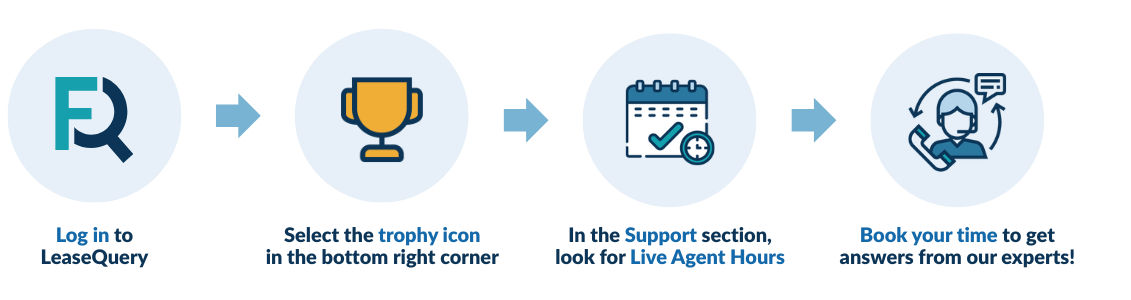
Check out our monthly trainings and live agent hours exclusively for LeaseQuery customers!
Monthly Training Webinars
August: Lease Incentives
August 28, 2026
1:00 PM – 2:00 PM ET
Master Lease Incentives in LeaseQuery: Learn best practices, amortization schedule impacts, and entering incentives into LeaseQuery. Get your FAQ’s answered and confidently handle lease incentives!

September: Catch-up Journal Entries and Global Locks
September 25, 2026
1:00 PM – 2:00 PM ET
This webinar offers a detailed exploration of LeaseQuery’s Catch-Up Functionality for both new leases and changes to existing ones that may have been missed. We will also provide a comprehensive overview of the Lock Entries feature and its crucial role in this process. Learn about the impact on your journal entries and reporting, and gain a clear understanding of which changes generate catch-up entries and which do not. Join us to master these essential features and ensure accuracy

October: Liabilities Rollforward
October 23, 2026
1:00 PM – 2:00 PM ET
This session will cover LeaseQuery’s Liability Rollforward Report and how to reconcile it to the account balances from the system. In this session, we want our clients to be able to gather more context behind the reports and ways they can optimize the information within the system.
Reporting Under GASB?
Our monthly training webinars are great ways to learn the tool, but check out our new 3-part training series specifically on GASB functionalities!
New LeaseQuery Functionality: Catch-Up Changes!
View the recorded training – for clients reporting under ASC 842 or IFRS 16 only.
We are excited to introduce our new Catch-Up Changes functionality for ASC 842 or IFRS 16. Use the link below to watch a recording of the overview and a demo of the functionality. Catch-Up Changes will automatically provide journal entries to adjust your general ledger and record missed lease changes entered in LeaseQuery.