G2 has ranked us #1 for 20 quarters running - a dynasty built on 5 years of unwavering consistency.
Read The Report

FinQuery Accrual & Prepaid Accounting

Stop Auditing Spreadsheets. Start Automating the Close.

The era of manual roll-forwards and fragile Excel workbooks is over. FinQuery transforms your source documents—contracts, SOWs, and invoices—into an intelligent Unified Subledger that automatically generates accurate journal entries needed for an audit-ready close.

  • Eliminate surprises: FinQuery matches AP files or invoices to source records, identifies discrepancies, and automatically books catch-up or true-up adjustments to keep your schedules accurate.
  • Audit-Ready by Design: Every entry is linked to its source document for 100% traceability and read-only auditor access eliminates tedious PBC pulls.
  • Accelerate Your Close: FinQuery automatically flags missing payments and books corresponding accruals, ending the manual hunt, and shaving time off your close.

Get a Demo

Einstein
Lands End
Frontier
Community Bank
Choice Hotels Logo

How It Works

Intelligent subledger automates the accounting heavy lifting

Add Contracts

Intelligent Data Capture

Forward invoices, SOWs, or contracts directly to your AI-enabled inbox. Our engine automatically extracts key financial terms and payment obligations, transforming source documents into active data points without manual entry.

Manage in One Place

Automated Schedule Governance

The system builds dynamic expense schedules, automating straight-line amortization, pro-rated partial months, and catch-up logic, while proactively flagging missing invoices to eliminate month-end surprises.

Track & Analyze

One Click Journal Entries

Generate schedule-backed journal entries and roll-forward reports with a single click.

Why Automate Accrual and Prepaid Accounting?

Single Subledger

Reclaim Your Time

Retire the manual roll-forward, complex Excel schedules, and versioning nightmares. Move the close from days to hours.
Single-Click Journal Entries

Audit Confidently

Built for the way auditors think. Our source-to-close accrual and prepaid solution isn’t just a workflow; it’s a safety net.
Expense Forecasting

Eliminate Errors

Remove the rounding discrepancies and manual entry risks inherent in Excel.
AI-enabled Data Entry

Enhance Controls

Centralize every schedule in an indisputable trail. 97% of “Big R” restatements involve ineffective internal controls.
Rollforward Reporting

Scale Painlessly

Add accruals and prepaids without adding lines to a spreadsheet.
Financial Segment Allocation

Forecast More Accurately

Stop reporting on “trend guesses” and start reporting on source-driven financial truth.

“In FinQuery, I did the journal entry download, uploaded it, and ran the report afterwards, and it tied. And I’m like, oh, that’s great!”

Kelly Swick

Systems Controller

Why Choose an Intelligent Source-to-Close Subledger?
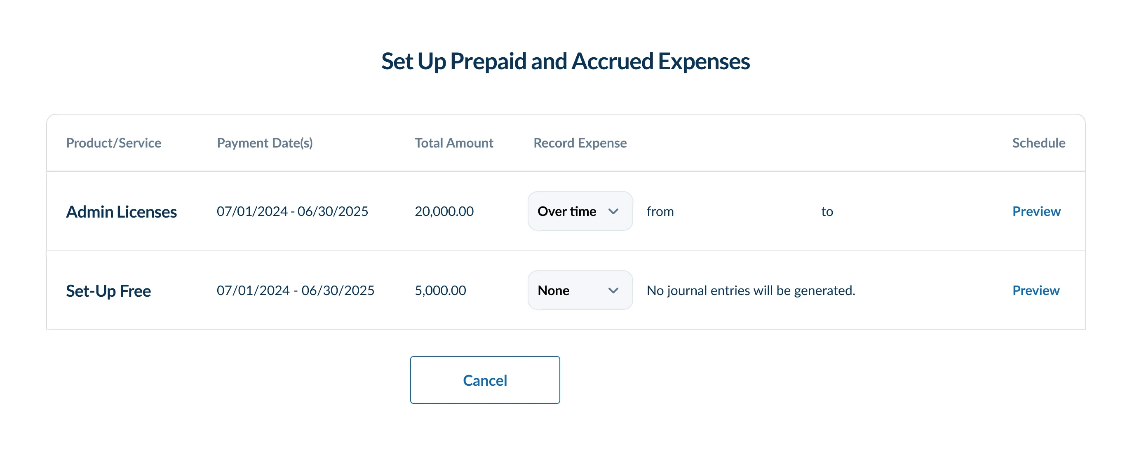
Prepaid and Accrued Expenses Product Screenshot
  • Automated Expected-to-Actual Reconciliation: FinQuery automatically matches AP transactions against expected schedules, instantly flagging variances and booking catch-up or true-up adjustments to keep your schedules accurate.
  • Proactive Missing Accrual Detection: Eliminate surprises that derail your close. FinQuery identifies missing invoices or late renewals by cross-referencing your centralized source document repository, alerting you to necessary accruals before they become audit deficiencies.
  • Zero-Manual Catch-Up Logic: Stop the tedious manual adjustments. When late invoices arrive or terms change, FinQuery automatically calculates and books catch-up entries, maintaining real-time accuracy across your schedules and journal entries.
  • Ironclad Audit Traceability: Built for the way auditors think. By linking every GL entry back to the original validated source document, FinQuery provides 100% traceability. Read-only auditor access eliminates manual PBC pulls.

Features

Single Subledger

Unified Subledger

Simplify audits by centralizing all source documents and accounting outputs in one secure subledger, complete with a full audit trail.
Single-Click Journal Entries

Proprietary AI Data Extraction

Eliminate manual entry by forwarding invoices, SOWs, or contracts directly to your AI-enabled inbox. Our engine automatically extracts key financial terms—including payment schedules and service periods—to set up the correct expense treatment instantly.
Expense Forecasting

Automated Expense Schedule Governance

Effortlessly generate and manage complex schedules for both accrued and prepaid expenses. The system automates straight-line amortization and pro-rated calculations, giving you flexibility without sacrificing accuracy.
AI-enabled Data Entry

Single-Click ERP Integration

Seamlessly push schedule-backed journal entries directly to your General Ledger. FinQuery supports custom SFTP integrations and allows for granular financial segment allocation by department, cost center, or custom dimension.
Rollforward Reporting

Automated Expected-vs-Actual Reconciliation

The system automatically ticks-and-ties your AP transactions against expected schedules. It proactively flags missing invoices and suggests precise true-up entries, moving your team from manual review to exception management.
Financial Segment Allocation

Intelligent Catch-Up Logic

Reclaim your time at close. FinQuery automatically calculates and books catch-up entries for late invoices, missed renewals, or mid-period term changes, maintaining continuous accuracy without manual intervention.
Audit Trail

Audit-Ready Reporting Studio

Access pre-built, standard reports—including detailed roll-forwards, account reconciliations, and expense forecasting. Every report is backed by a 100% traceable audit trail that links every record back to the original source document.
Automated Amortization

Proactive Renewal & Spend Alerts

Stay ahead of your renewals with customized alerts for opt-out dates, expiration milestones, and contract clauses. Transition from passive invoice approval to rigorous financial oversight and eliminate accidental auto-renewals.

FAQs

What are the FinQuery Accruals & Prepaids outputs?

FinQuery automates accrued and prepaid expense amortization schedules, journal entries, expense forecasting reports, and accrued liability/prepaid asset rollforward reports for reconciliations.

What kind of source information can the solution use?

FinQuery is built to be flexible. It takes unstructured source documents – an invoice, a contract, a receipt, or even an email – and extracts data to set up accounting workflows and create a digital trail from every subledger post back to the source.

What if I don’t have a source document?

The system is flexible and no actual source document is required. You can manually enter the information you have if you do not have access to any kind of source document. The system can then use that information to automate accounting workflows and you will still save a great deal of manual accounting effort.

Are the number of users limited?

No. You can provide as many users access as you wish, enabling multiple users to manage source documents, prepaids, and accruals. Role-based access enables you to determine who has access to what documents or features.

Are there multiple user types?

Yes. Role-based access enables you to determine who has access to what documents or features. For example, you can grant your auditors read-only access to further streamline your audit process.

Is FinQuery Accruals & Prepaids SSO compatible?

Yes. FinQuery Accruals & Prepaids integrates with any single sign-on (SSO) system that supports Security Assertion Markup Language (SAML) 2.0.